CamHeard or Syncaila: an honest comparison
CamHeard is an app that syncs your cameras and audio recorders by sound. It then gives you a ready timeline for Premiere Pro, DaVinci Resolve or Final Cut Pro. It works for one camera and a recorder, and for a full day on eight cameras. It runs on macOS and Windows and is made in Ukraine.
If you are looking at Syncaila, you have the same job to do. Both apps sync by sound, run on Mac and Windows and have a free tier. The differences are where you start, which editor you use and how you pay.
Side by side
| CamHeard | Syncaila | |
|---|---|---|
| Where you start | Your shoot folder, with a folder per camera and recorder inside, or an XML exported from Premiere Pro, DaVinci Resolve or Final Cut Pro | A sequence exported from your editor as XML or AAF, each device on its own track |
| Editors | Premiere Pro, DaVinci Resolve, Final Cut Pro | Final Cut Pro, Media Composer, DaVinci Resolve, Premiere Pro, VEGAS Pro, EDIUS |
| Mac | macOS 15 or later on Apple silicon | macOS 11 Big Sur or later |
| Windows | Windows 10 and 11, 64-bit | Windows 10 and later, 64-bit |
| Trial | 14 days of the full app, no card, no account | 20 days of the full licence: 10 after install, 10 more after you register an email |
| Free tier | Projects up to 20 clips | 20 clips on 2 tracks |
| Internet | Not needed to sync or export | Needed for activation and updates, during the trial, and on every run with a SEASON licence |
| Licences | $15 a month or $144 a year. Pro for life, $249: one key for macOS and Windows, active on one computer at a time, moves to another in two clicks. Studio for life, $599, three computers at once. | FULL for life, all tracks. SYNC-3 for life, 3 tracks. SEASON, 6 months, all tracks. One key for macOS and Windows, up to 3 computers used one at a time. Prices on syncaila.com. |
How the work goes
With CamHeard, you copy the footage the way you normally do: one folder for the shoot, with a folder for each camera and recorder inside. That way cameras that were recording at the same time land on separate tracks. Drag the shoot folder onto the window, press Sync, then Export. Open the timeline in your editor. Clips CamHeard could not confirm are marked for review, so you know what to check.
With Syncaila, you import the footage into your editor first. Each camera and recorder goes on its own track. If one device recorded several files at once, those need separate tracks too. Then you export the sequence as XML or AAF and sync it in Syncaila. The result goes back into your editor.
One shooting day with 8 cameras and a recorder: 215 files, 8.9 hours of footage. CamHeard 0.4.35 synced it in about a minute on a MacBook Pro with an M3 Max. We do not compare speed with Syncaila: we have not measured both apps on the same footage.
Syncaila in 2026: price, version 3, Mac and DaVinci Resolve
How much does Syncaila cost?
Syncaila sells three licences. FULL is $249 plus tax, for life, on all tracks. SYNC-3 is $125 plus tax, for life, on 3 tracks. You can upgrade it to FULL by paying the difference. SEASON is $42 plus tax for 6 months, on all tracks, and does not renew by itself. Syncaila says its lifetime licences include later versions at no extra fee.
The free tier syncs 20 clips on 2 tracks and comes with 20 days of the FULL licence. CamHeard is $15 a month, $144 a year or $249 for life.
Syncaila 3: which version is current?
Syncaila 3.1.1 came out on November 5, 2026, for Windows and macOS. The older Syncaila 2.7.8, from June 19, 2025, is still offered as an alternative. Starting with Syncaila 3, the 20-day trial is split into two parts of 10 days. You get the second part after you register in the License Info window.
Does Syncaila run on a Mac?
Yes. Syncaila lists macOS 11 Big Sur and later, and Windows 10 and later, 64-bit. One licence key works on both systems. You can use it on up to three computers, one at a time. CamHeard needs macOS 15 or later on Apple silicon, or Windows 10 or 11, 64-bit.
Does Syncaila work with DaVinci Resolve?
Yes, through a file you export from Resolve. Syncaila reads an XML or AAF exported from DaVinci Resolve. The synced result comes back as XML or AAF. In Syncaila's compatibility table, AAF gets two check marks for Resolve. FCP 7 XML and FCPXML get one each. Syncaila says the number of marks reflects how well the editor handles each format. Its guide asks you to import the result back into the editor where the project was made.
When Syncaila is the better choice
You edit in Media Composer, VEGAS Pro or EDIUS. CamHeard exports only to Premiere Pro, DaVinci Resolve and Final Cut Pro.
Your Mac runs macOS 11 to 14. Syncaila lists macOS 11 Big Sur and later. CamHeard needs macOS 15 or later on Apple silicon.
Your clips already sit in a sequence. Syncaila syncs that sequence, and you import the result back into the same editor. CamHeard reads the sequence XML too, but builds a new timeline.
You want more time to test. The Syncaila trial is 20 days, the CamHeard trial is 14.
When CamHeard fits better
You edit in Premiere Pro, DaVinci Resolve or Final Cut Pro. Your card folders go straight in, and CamHeard lays out the tracks.
You want the work to stay on your computer. Sync and export run offline, with no account. Your footage never leaves the machine.
You prefer to pay monthly. CamHeard is $15 a month, and you can cancel in one click. Or you buy it once for $249.
Your projects are small. Projects up to 20 clips stay free after the trial, with the full engine and export to all three editors.
Features
What you get after Sync
Several cameras and recorders, whole shooting days, one window. Here is what comes out.
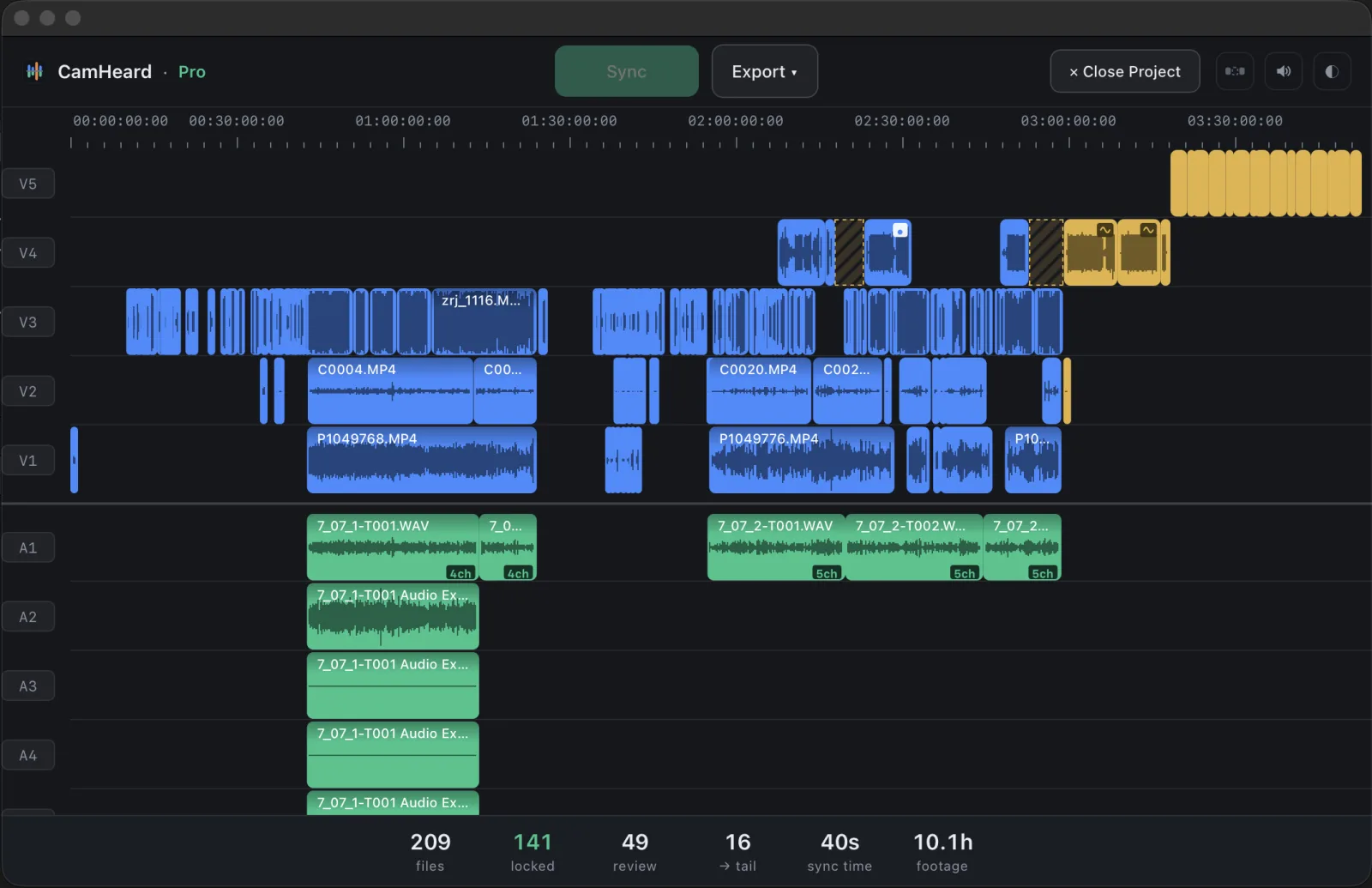
One shoot, after Sync
A real shoot: a sequence from Premiere Pro with five cameras and a multichannel recorder, 209 files. After Sync, 141 clips are locked by sound, 49 are marked for a quick listen, and what CamHeard could not place waits in gold at the end. In the export, each recorder channel gets its own track.
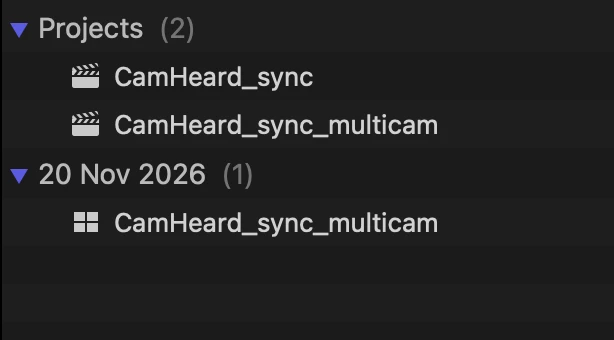
Final Cut Pro: a synced project and a multicam clip, from one export
Export once. Final Cut Pro gets a regular synced project and a real multicam clip with the cameras as angles, plus a project with that clip already on the timeline. Cut whichever you prefer.
Clips CamHeard could not place stay out of the multicam clip. A shoot from a single device gives no multicam clip. Premiere Pro and DaVinci Resolve get a synced timeline.
Long takes, no drift.
CamHeard evens out drift to the frame, and tighter.
Camera clocks that are wrong
Where cameras share sound with other devices, clips land by sound, even when the camera clock is off by minutes or years. A clip that only one device recorded stays on its clock or goes to the end, and is marked, so you know to check it.

Every clip tells you where it stands
Hover any clip to see its state, such as locked, review or tail. One click on review lights up the clips worth a listen and dims the rest.
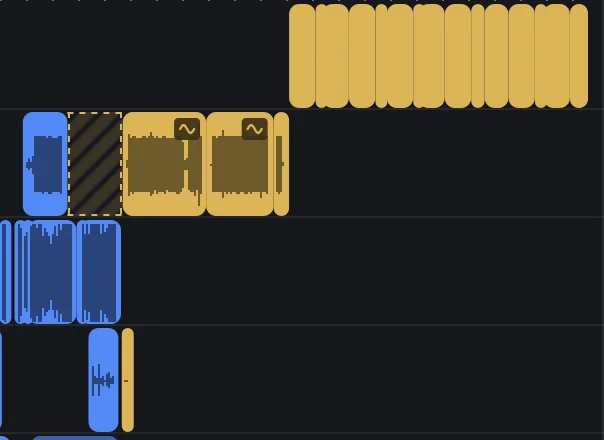
Unplaced clips stay in sight
Clips CamHeard could not place go to the end of the timeline, and the window shows why. In the export, Premiere Pro gets a yellow label on them and Final Cut Pro a Not Synced role and a marker. The file for DaVinci Resolve carries no mark for them.

Multichannel recorders, a track per channel
Each channel of a multichannel recorder is written to its own track in the export. In DaVinci Resolve you set Source Channel for each recorder track by hand, and CamHeard tells you where.
VideoMP4 · MOV · MXF · BRAW · R3D · MTS · M2TS · AVI · MKV · M4V · MPG · MPEG · M2T · TS · MOD · TOD · DV · 3GP · 3G2 · WMV
AudioWAV · MP3 · M4A · AIFF · FLAC · CAF · AAC · OGG · OPUS
Drop in everything you shot
Cameras, phones (HEVC from iPhone too), action cameras, drones, old camcorders and recorders go into one window. A clip with no sound of its own waits at the end of the timeline. Blackmagic RAW goes in as it is, with no proxies and no transcoding. On a Mac, CamHeard supports R3D files from RED cameras. When you export to Final Cut Pro, CamHeard usually asks whether to add RAW clips to the project, because Final Cut Pro reads them only with a plug-in.
Old camcorder files (MPG, MPEG, MOD, TOD, DV, WMV) go to Premiere Pro. Final Cut Pro can't open them, so CamHeard leaves them out of its file and tells you. The DaVinci Resolve file leaves out MPG, MPEG, MOD and TOD files and any other MPEG-2 video. When a clip's frame rate clearly varies (phone, WhatsApp, screen recording), CamHeard warns you on import, so you can convert it to a constant frame rate before editing.
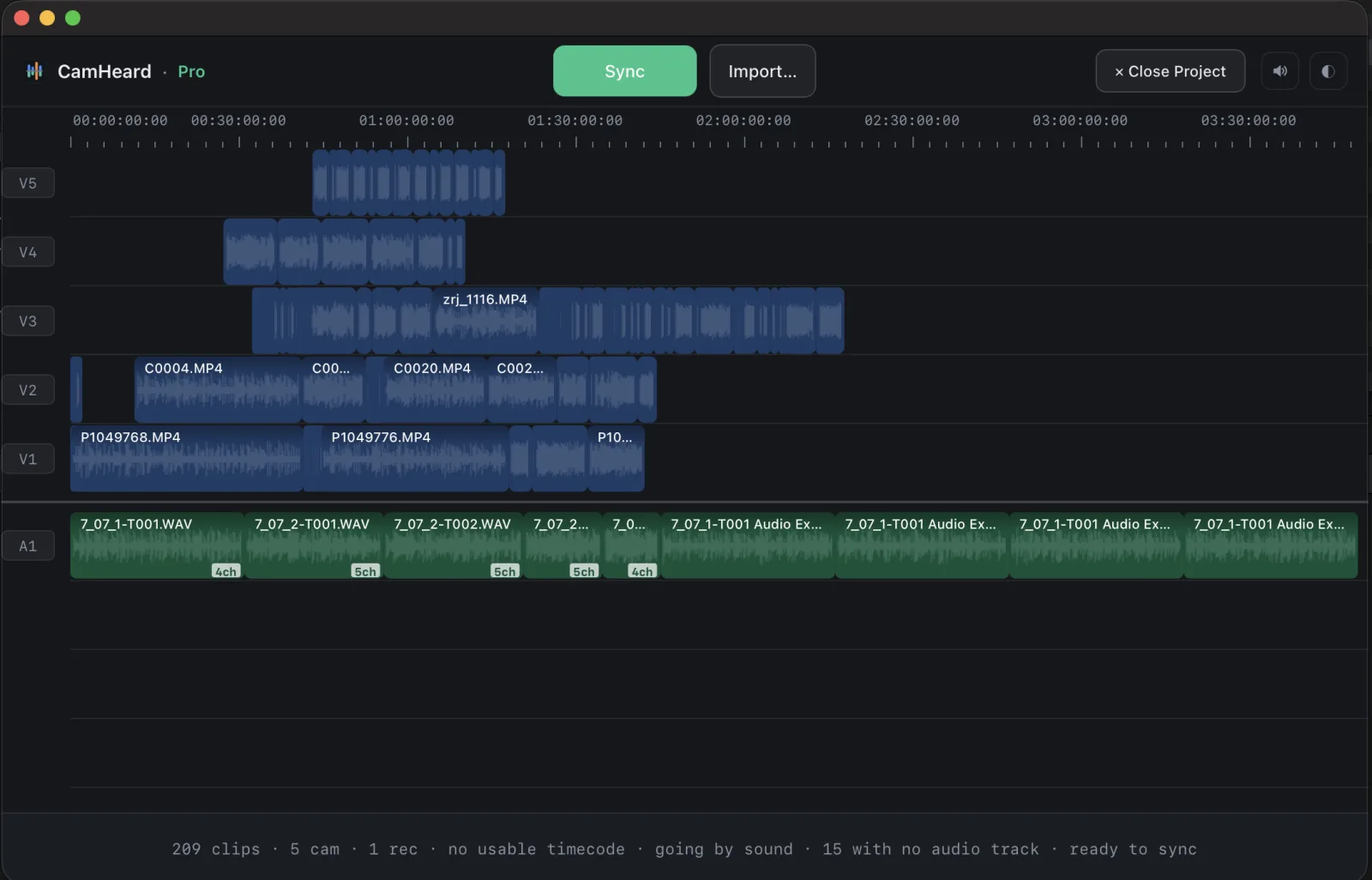
Footage or a sequence. Your call.
Drop your files in just as they sit on the drive. Or drop the XML of a sequence you already started, if that suits you better. CamHeard syncs either one.
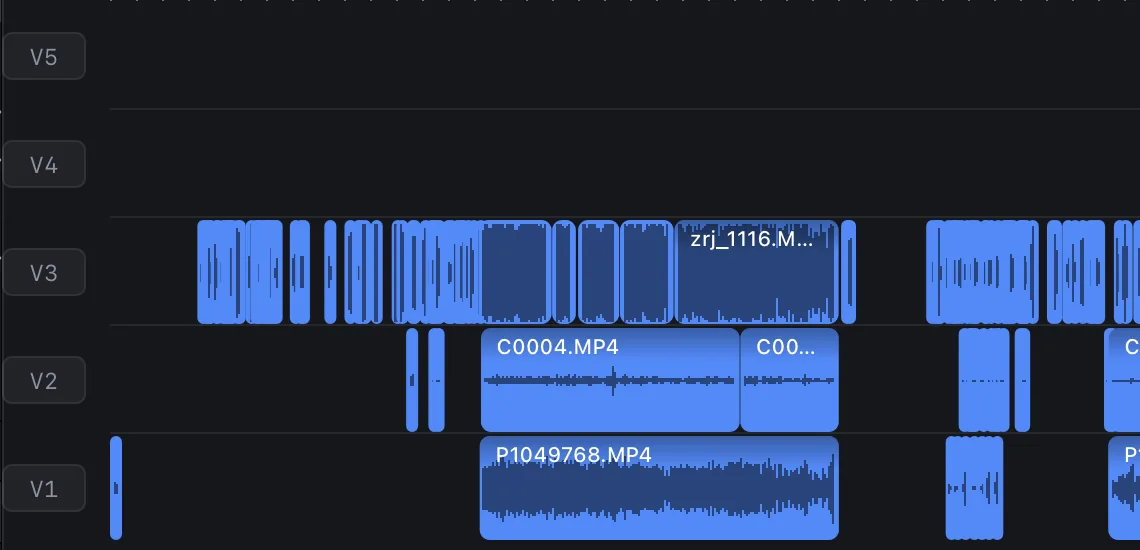
Your track order comes with you
Drag the tracks into the order you like to cut in and remove what you do not need. Premiere Pro, DaVinci Resolve and Final Cut Pro get the same camera track order.
Syncaila vs PluralEyes in 2026
PluralEyes has been in limited maintenance mode at Maxon since 2023, with no new features. Syncaila is still updated in 2026. If you are moving off PluralEyes, test Syncaila and CamHeard on your own shoot.
Frequently asked questions
- Does CamHeard make a multicam clip for Final Cut Pro?
- Yes. One export to Final Cut Pro gives you a regular synced project and a real multicam clip with the cameras as angles, plus a project with that clip already on the timeline. Clips CamHeard could not place are not in the multicam clip, and a shoot from a single device gives no multicam clip. Premiere Pro and DaVinci Resolve get a synced timeline.
- Is CamHeard an alternative to Syncaila?
- Yes. Both sync cameras and recorders by sound and hand the result to your editor. CamHeard starts from your footage folders or from an XML exported from Premiere Pro, DaVinci Resolve or Final Cut Pro. Syncaila works through an XML or AAF from your editor and supports more editors.
- Is there a free version of CamHeard or Syncaila?
- Both have a free tier. CamHeard gives 14 days of the full app, then projects up to 20 clips stay free. Syncaila gives 20 days of the full licence, then 20 clips on 2 tracks stay free.
- Do CamHeard and Syncaila need an internet connection?
- CamHeard syncs and exports without internet and needs no account. Syncaila's guide asks for internet on activation, on updates and during the trial. With a SEASON licence it needs internet on every run. On the free tier it does not.
- Does CamHeard work with Media Composer, VEGAS Pro or EDIUS?
- No. CamHeard exports to Premiere Pro, DaVinci Resolve and Final Cut Pro. Syncaila supports those three and also Media Composer, VEGAS Pro and EDIUS.
- Which is better, Syncaila or PluralEyes?
- We have not tested the two side by side. PluralEyes has been in limited maintenance mode at Maxon since 2023. Syncaila is still updated.
Try it on your own shoot. 14 days of the full app, no card, no account.
Download CamHeard freemacOS 15+ · Apple silicon · 50 MB | Windows 10/11 64-bit · 25 MB