Clips without proof: at the end or by the logic of the shoot
Clips with no audio proof can either sit together at the end of the timeline, or stand at approximate places by the logic of the shoot. One switch above the timeline decides that.

Off
Everything without audio proof lies together at the end. Nothing in the body of the timeline pretends to be synced. This is the default.
On
The same clips take approximate places: by the logic of the shoot, between their neighbours by file number. They stay gold, because this is a guess, not a sync. Handy when you want to see b-roll and cutaways roughly where they were shot.
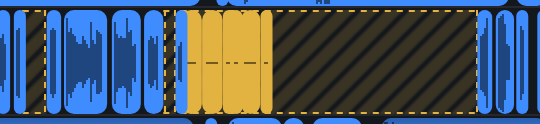
This affects the export. What goes into the exported file is what you see on the screen. Turn it on and the gold clips will stand in the middle of the shoot in your editor; turn it off and they will lie at the end.
How this differs from review
Review clips stand in the right place in time and count as synced, they simply lack a final confirmation. The clips at the end are not synced at all: there was nothing to sync them with. The switch concerns only the latter.