Export overview
The export writes a timeline file that you open in your editor. A separate file for each editor, because they expect different things.
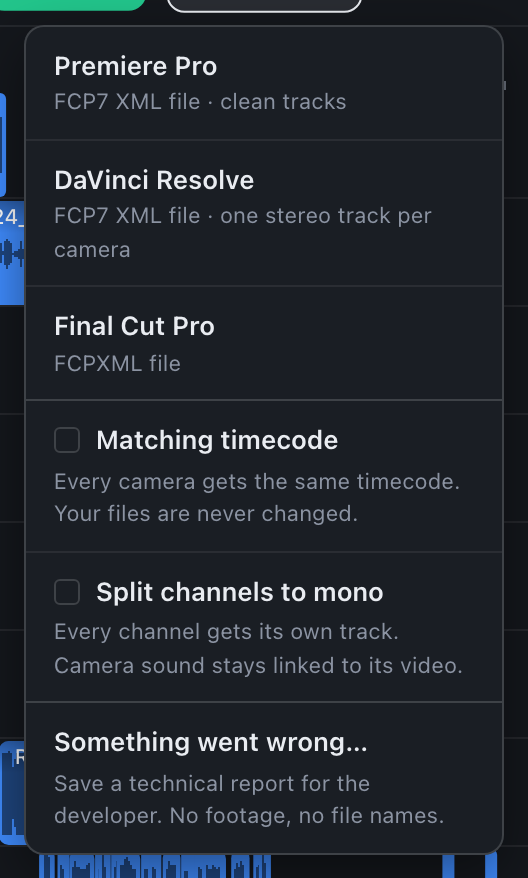
| Editor | File | Format |
|---|---|---|
| Adobe Premiere Pro | CamHeard_sync.xml | FCP7 XML, clean tracks |
| DaVinci Resolve | CamHeard_sync_DR.xml | FCP7 XML in the Resolve dialect, one stereo track per camera |
| Final Cut Pro | CamHeard_sync_FCP.fcpxml | FCPXML |
What is in the file
The shape is the same everywhere: a track per camera, its sound next to it, the recorder below. Along with the layout, everything you did on the timeline travels into the file:
- removed clips do not get into the file;
- the track order you set by dragging;
- the state of the Unplaced clips in shooting order switch: at the end, or by the logic of the shoot, exactly as on screen;
- the Matching timecode and Split channels to mono checkboxes.
Unsynced material travels too, to the end of the sequence, so that no file gets lost. Your files on disk are not changed.
File names
The first export into a folder gets a name without a number, the next ones _1, _2 and so on. The sequence inside the file is named like the file, so two exports cannot be confused. The folder of the last export is remembered.
Messages after the export
| Message | What it means |
|---|---|
| Saved CamHeard_sync.xml · 209/209 media verified | The file is written and every media file is in place. You will not have to relink anything in your editor. |
| ⚠ 205/209 media found, 4 missing (may relink) | Four files are no longer on disk where they were during the sync. The editor will ask you to find them. |
| ⚠ 3 clip(s) (.MPG), DaVinci Resolve can't decode this format | These files will come in offline in Resolve or Final Cut. Transcode them if you need them. |
| recorder has 5 channels: in Resolve select each recorder track's clips… | A reminder about assigning recorder channels in Resolve. See Multichannel recorders. |
| Matching timecode skipped… | For Resolve and Final Cut this checkbox does not apply. See Export options. |